Win順:雙擊 Ctrl
· 頻道:Widget软件工具资源分享 · 閱讀 17035
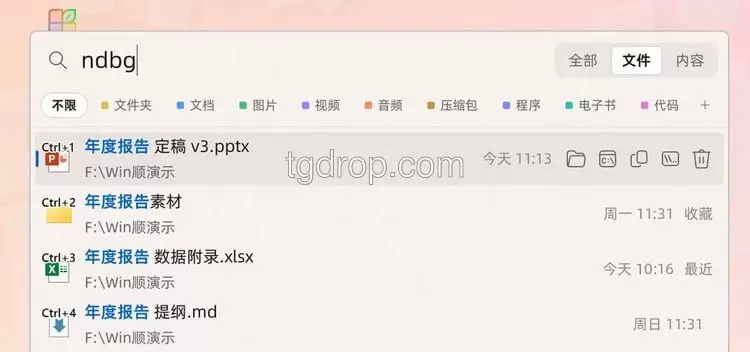
1. Win順是一款免費開源的 Windows 快速搜索與啟動工具,雙擊 Ctrl 即可呼出搜索框,數百萬文件也能秒級檢索。它的做法是直接讀取 NTFS 主文件表建立索引,索引隨文件變動實時更新,所以不需要長時間預掃描;檢索維度覆蓋文件名、拼音首字母與全文內容,Word、Excel、PPT、PDF 等文檔可直接搜到正文,同時把應用、系統設置、網頁以及 NAS 共享文件夾納入同一個入口。對長期被 Windows 自帶搜索拖慢的人來說,這類讀 MFT 的方案在速度和資源佔用上通常更划算;需要留意的是全文索引對磁盤空間的佔用,以及映射網絡盤時的權限設置,先小範圍試跑再全盤開啟更穩妥。
2. 原文內容:Win順 Windows 快速搜索與啟動工具,雙擊 Ctrl 即可呼出搜索框,支持文件名、拼音首字母、全文內容搜索,可檢索 Word、Excel、PPT、PDF 等文檔⋯⋯(後半略)
3. WinShun is a free, open-source search-and-launch tool for Windows that appears with a double tap of Ctrl. It indexes file names, pinyin initials and full document text across Word, Excel, PowerPoint and PDF files, and also surfaces apps, system settings, web results and NAS shares. Because it reads the NTFS master file table directly, its index updates in real time and stays responsive across millions of files.
該內容經過二次創作,已經去除違法違規內容。
#文件搜索 #开源